

Other cookies are configurable.
Best AI SEO Tools in 2026: 7 Picks Proven on 60+ Tech Brands


The best AI SEO tools are the ones tied to a job in the SEO process. Six years of SEO and GEO work on 60+ SaaS, app and AI brands come down to seven tools. Here they are in the order they get used: audit and research, on-page and content, off-page, tracking and refresh. For each one you get the job, the ways to use it that most people miss, and where it gets things wrong.
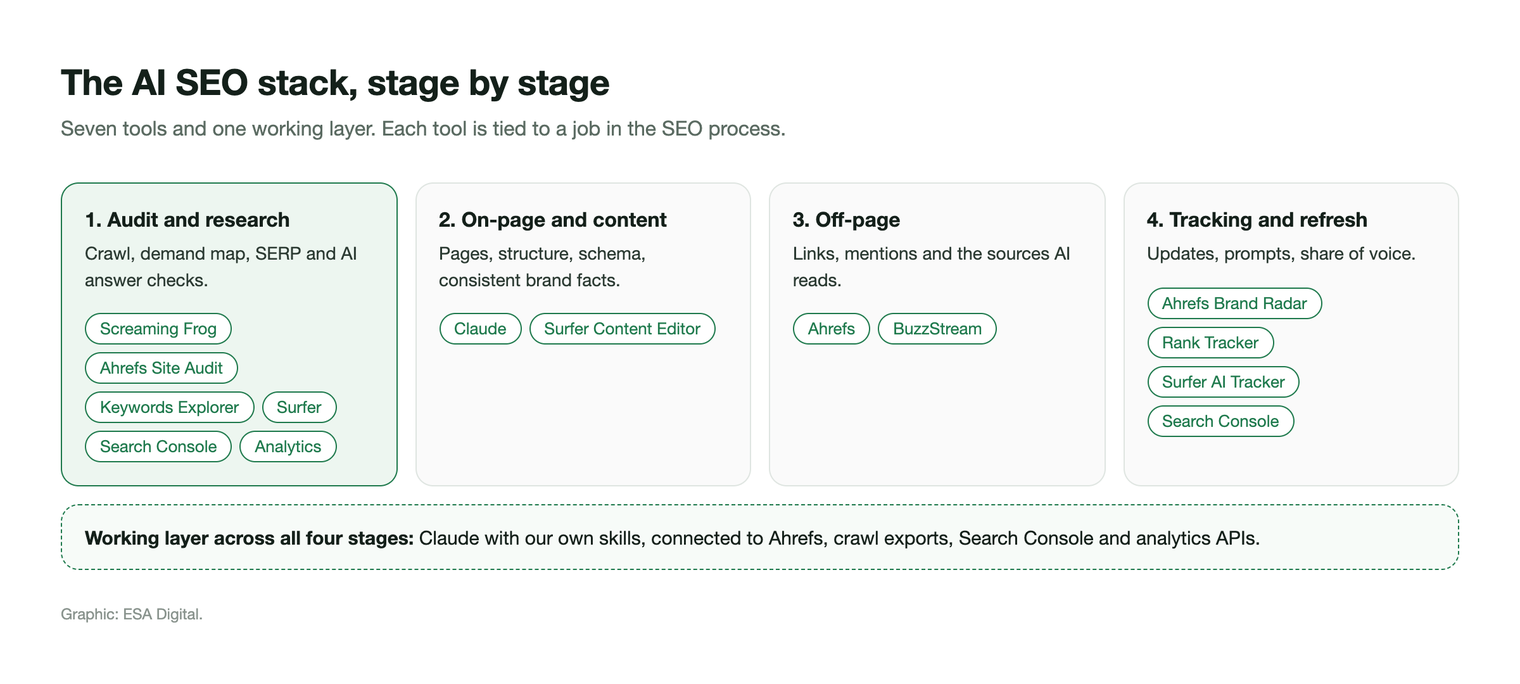
The stack at a glance
| Stage | Job | Tool | What the AI part does |
|---|---|---|---|
| Audit | Technical crawl | Screaming Frog, Ahrefs Site Audit | Flags issues, runs custom prompts on crawl data |
| Audit | SERP and AI answer check | Scrapers plus Claude | Collects results, compares who ranks and who is cited |
| Audit | Keyword research | Ahrefs Keywords Explorer | Suggests terms, labels search intent |
| Audit | Page against search results | Surfer | Compares terms with top ranking pages, extracting NLP terms |
| On-page and content | Briefs, schema, fact checks | Claude | Drafts, clusters, cross-checks sources |
| On-page and content | Content optimization | Surfer Content Editor | Scores a draft against the search results and LLM results |
| Off-page | Targets and backlink analysis | Ahrefs | Finds pages that AI answers cite |
| Off-page | Outreach | BuzzStream | Keeps contacts and conversations in order |
| Tracking | AI visibility and rank tracking | Ahrefs Brand Radar, Rank Tracker, Surfer AI Tracker | Tracks mentions, citations and positions |
| All stages | Measurement | Google Search Console, Google Analytics, and any analytics system from PostHog and Plausible to Mixpanel | Reports impressions in AI features and AI referrals. AI skills match all metrics by page |
Stage 1. Audit and research: find what blocks growth
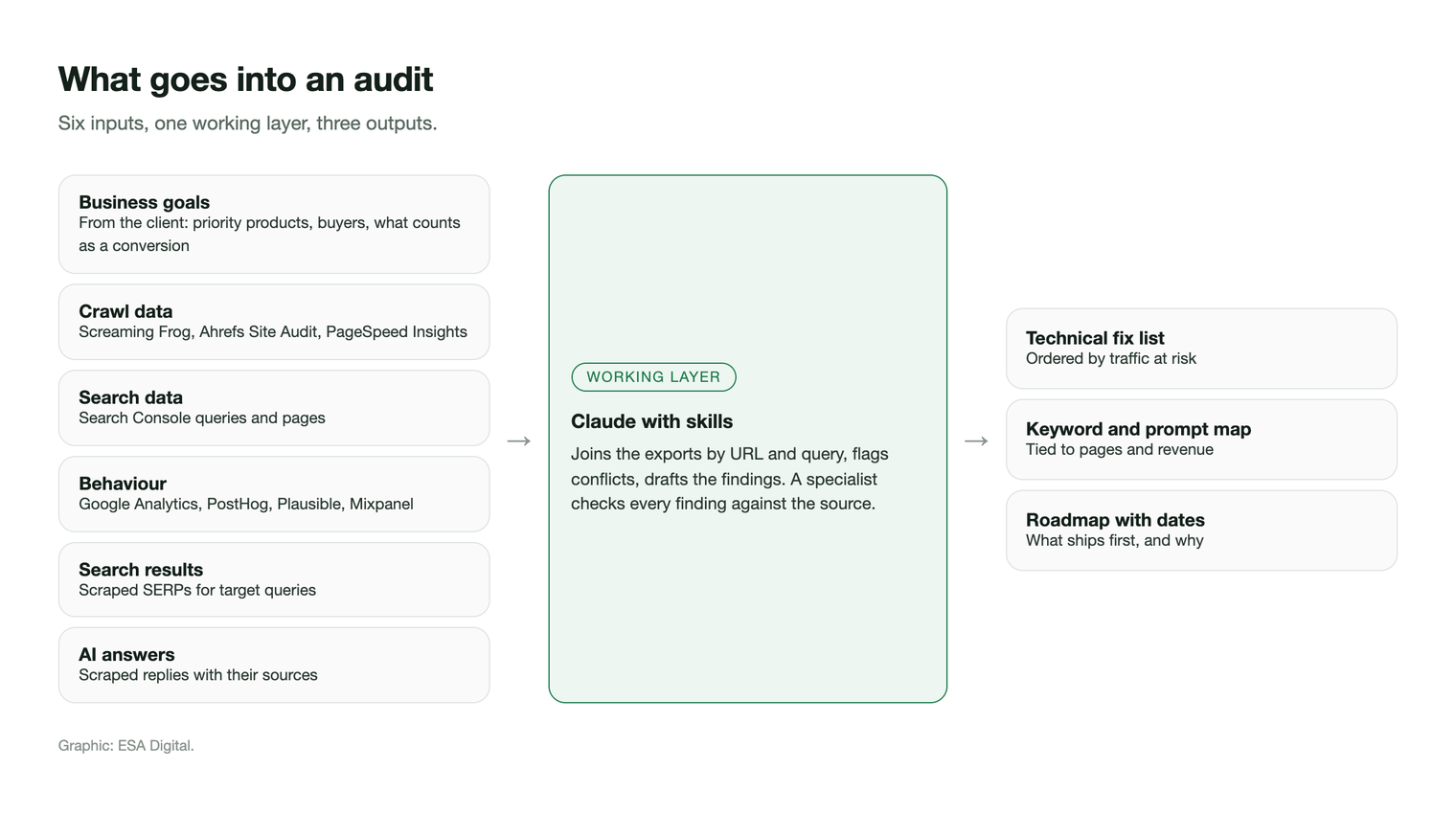
The output of an audit is a technical fix list, a keyword and prompt map, and a roadmap with dates. This stage uses the most SEO tools because it has the most inputs. One of them is not a tool at all: the business goals. Which product matters most, who buys it and what counts as a conversion decide how every finding is ranked.
1. Screaming Frog SEO Spider
Job: the full technical crawl.
Screaming Frog is a desktop crawler. It walks a site the way search engines do and returns every URL with its status code, title, meta tags, canonical, directives, internal linking and page load data. Technical SEO decisions need raw crawl data, and this is the cleanest source of it.
Ways to use it:
- Crawl with JavaScript rendering on. You see the page as search engines render it, not as the server sends it. Compare the two to find content that only exists after scripts run.
- Connect the Search Console, Google Analytics and PageSpeed Insights APIs. Every URL gets its clicks, sessions and Core Web Vitals next to its issues. Broken links on a page with 5,000 visits go to the top of the list.
- Run your own AI prompts on crawled pages. The crawler can send page content to OpenAI, Gemini or Anthropic models. Ask one narrow question per crawl: "Does this page state a price?", "What search intent does this page serve?", "Write alt text for this image."
- Find near-duplicate and off-topic pages with embeddings. Semantic similarity shows pages that compete for the same query and pages that do not fit the site's topic. It is the fastest way to spot keyword cannibalization.
- Extract anything with custom extraction. Pull authors, dates, prices or schema fields with XPath or regex. Useful for checking that structured data matches the visible page.
- Check a redirect map in list mode. Before a migration, upload the old URLs and confirm each one lands where it should.
- Compare two crawls. See what changed between releases: new broken links, lost canonicals, changed meta descriptions.
Where it goes wrong. The crawler reports everything, and most of it does not matter. A list of 4,000 issues is not an audit. Sort by traffic at risk before sending anything to developers.
Free version: up to 500 URLs per crawl, enough for many small businesses.
2. Ahrefs Site Audit
Job: the scheduled crawl with history.
Ahrefs Site Audit is a cloud crawler. Ahrefs says it checks for more than 180 SEO and AEO issues. It complements a desktop crawler in two ways: it keeps history, and it runs on a schedule, so site audits happen without anyone starting them.
Ways to use it:
- Schedule a weekly crawl. When errors jump, look at what was deployed that week. Continuous technical audits catch problems while they are still cheap to fix.
- Build custom filters in Page Explorer. For example: indexable pages with fewer than three internal links and more than 100 organic visits. That is a list of pages worth linking to.
- Use the internal link opportunities report. It suggests where to add links between pages that already rank for related terms.
- Crawl staging before a launch. Compare the two site audits and fix what the new version breaks.
- Check page speed in bulk. Connect PageSpeed data and sort templates, not single pages, by load time.
Where it goes wrong. The health score is a ratio of URLs with errors. A site can score 95 and still have its ten most valuable pages blocked. Report the pages, not the score.
Free version: Ahrefs Webmaster Tools includes site audits for websites you verify.
3. SERP and AI answer checks with scrapers and Claude
Job: see what search engines and AI assistants return today for your real queries.
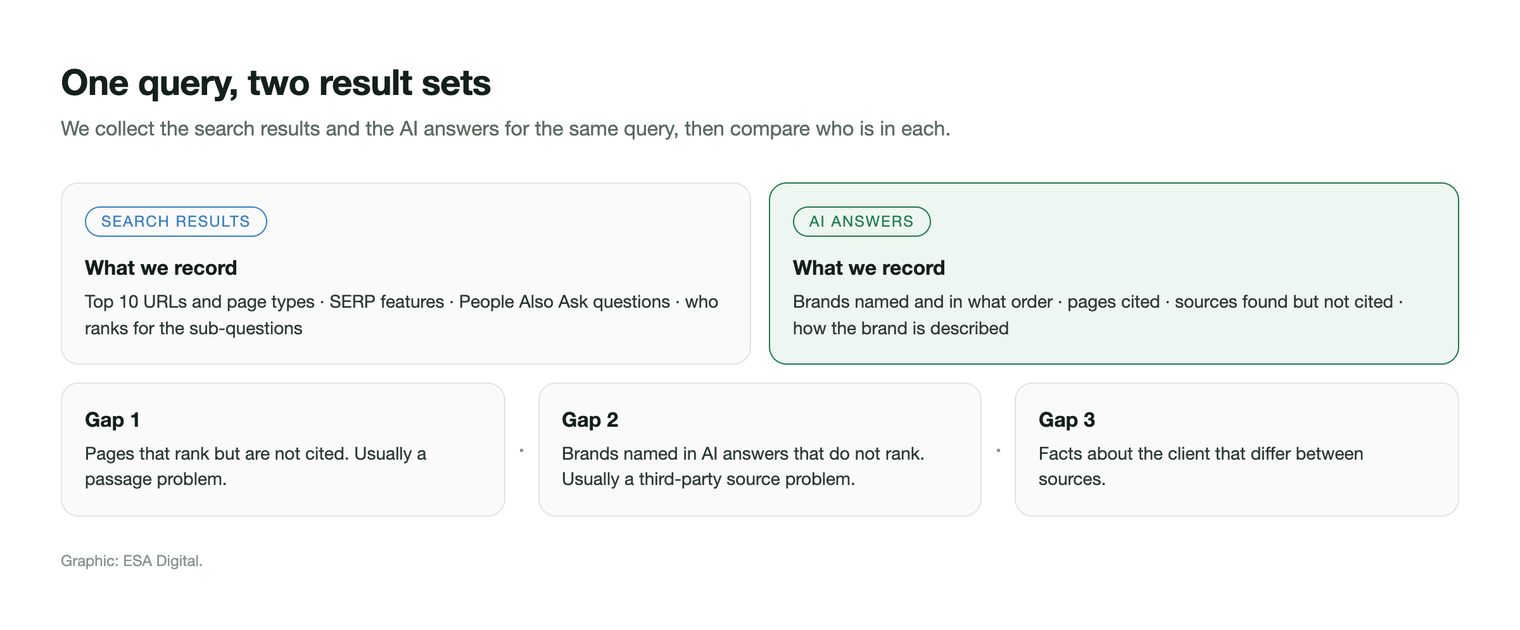
This is not one product. For each target query you collect two result sets with a scraper: the search engine results and the AI answers. Then an AI assistant compares them.
Ways to use it:
- Run a SERP analysis at scale. For 200 queries, record the top ten URLs, page types, SERP features and People Also Ask questions. You learn what page type each query needs before writing anything.
- Collect the AI answers for the same queries. Record which brands are named, in what order, which pages are cited and how your brand is described.
- Find pages that rank but are not cited. These usually have a passage problem: the answer is buried or needs context to make sense.
- Find brands that are named but do not rank. They got there through third-party sources. Their source list is your outreach list.
- Catch wrong facts. If an AI answer gives an old price or a feature you dropped, find the source it came from and fix it there.
- Turn People Also Ask into a prompt set. The questions people ask Google are close to what they ask AI assistants.
Where it goes wrong. AI answers change from run to run and by location. One run is a screenshot, not data. Repeat the runs and use averages. A person also has to read the results: a model will count a competitor's name inside a quote as a recommendation.
4. Ahrefs Keywords Explorer
Job: keyword research and the demand map.
Keywords Explorer gives search volume, difficulty, the parent topic and the current SERP for any query. Its AI features suggest related terms and identify search intent for a list of keywords.
Ways to use it:
- Export matching terms and cluster them with an AI assistant. Several thousand rows become topic clusters in minutes. Each of the topic clusters gets a target keyword and a page type.
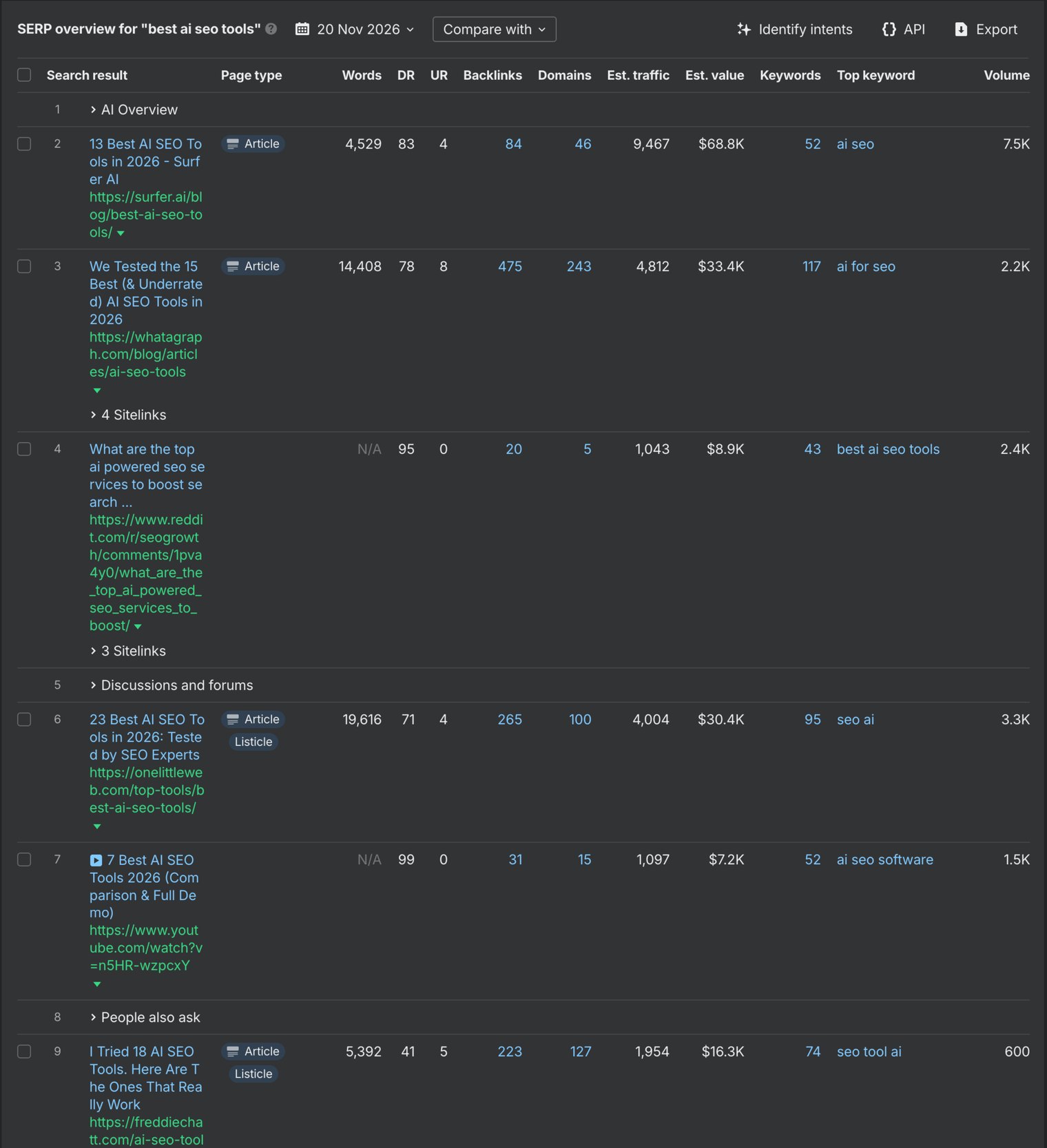
- Read the SERP overview before choosing a format. The screenshot above shows a Reddit thread and a YouTube video on the first page. That query wants opinions and demos, not a feature table.
- Filter by the lowest DR in the top ten. If a site with a low Domain Rating ranks, the keyword is open. The page with a DR of 41 above is that signal.
- Use Traffic Potential, not volume. One page ranks for hundreds of related queries. The parent topic shows whether a keyword needs its own page.
- Label search intent in bulk. Informational, commercial and navigational queries go to different page types.
- Compare volume by country. A keyword that is small in the US can be the main one in another market.
Where it goes wrong. Search data for new AI-related queries is noisy. The export for this topic contained phrases such as "best seo ai tools. my location is usa." with a volume of 150. Those are prompts leaking into keyword research data, not demand. Keyword insights need a person who knows the market.
5. Surfer SEO for page against search results
Job: measure how far a page is from the pages that rank.
Surfer SEO compares a page with the top ranking pages for a query. It uses natural language processing to pull the terms those pages share and returns a range for each, plus word count and heading ranges. Natural language processing is the useful part: it finds phrases, not single words.
Ways to use it:
- Audit existing pages. Run key pages through the audit to see which ones drifted off topic after years of edits.
- Find the content gap at page level. The missing terms usually point to a missing section, not a missing word.
- Use it for competitor analysis. See which subtopics every competitor covers and you do not.
- Check drafts in Google Docs. Writers stay in the document they already use and see the score there.
- Plan refreshes. Rerun a page that slipped. New terms in the list show how the search results changed since you published.
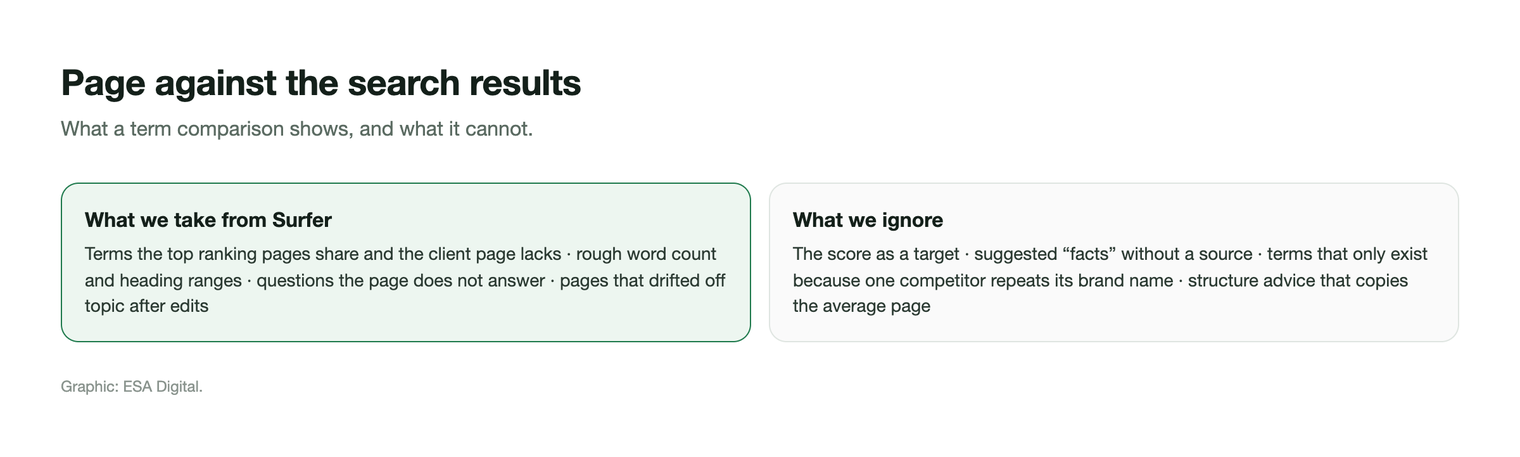
Where it goes wrong. The tool averages the search results. Follow it fully and you write the average page. It also suggests "facts to include" without sources. For this article it offered a share of marketers and hours saved per week. None could be traced, so none are here. Use the term list for relevance, and ignore the suggested word count when the topic needs more or less.
6. Google Search Console, Google Analytics and product analytics
Job: the ground truth.
Every other tool estimates what search engines do. Google Search Console shows real queries, clicks, positions and indexation. Analytics shows what visitors did next. Both are free tools. The same logic applies to any analytics system the product already runs, from PostHog and Plausible to Mixpanel: that is where sign-ups, activations and revenue live.
Ways to use it:
- Filter queries with regex. A pattern such as
^(how|what|why|can|does)shows the questions your site already appears for. Those are your first answer-ready pages. - Compare periods to find decaying pages. Pages that lost clicks over six months go into the refresh list.
- Open the generative AI report. Since June 2026 Search Console shows impressions in AI Overviews and AI Mode by page.
- Use the AI assistant channel in Google Analytics. Website traffic from ChatGPT or Perplexity is visible without custom setup, with conversions next to it.
- Pull data through the APIs, not the interface. The Search Console API returns far more rows than the 1,000 the interface shows. The Analytics Data API, and the APIs of PostHog, Plausible or Mixpanel, return events and conversions by page.
- Match all metrics together with AI skills. A skill is a written procedure an AI assistant follows. Ours pulls impressions, clicks, positions, sessions, sign-ups and revenue events from each API and joins them by URL. One table then shows which pages get search demand and which ones turn it into money.
- Find the mismatch. Pages with high impressions and no conversions need a better offer. Pages that convert well and have few impressions need more visibility. Neither shows up when you look at one system at a time.
Both reports are explained in our answer engine optimization guide.
Where it goes wrong. Search Console hides many long queries and does not show which queries triggered an AI answer. Analytics loses sessions when visitors decline cookies.
Stage 2. On-page and content: pages, structure and brand facts
After the audit comes fixing what blocks growth and building the pages that convert. The main tool here is an AI assistant. The main risk is letting it work unsupervised.
7. Claude as the working layer
Job: join data, run repeatable procedures, produce first drafts.
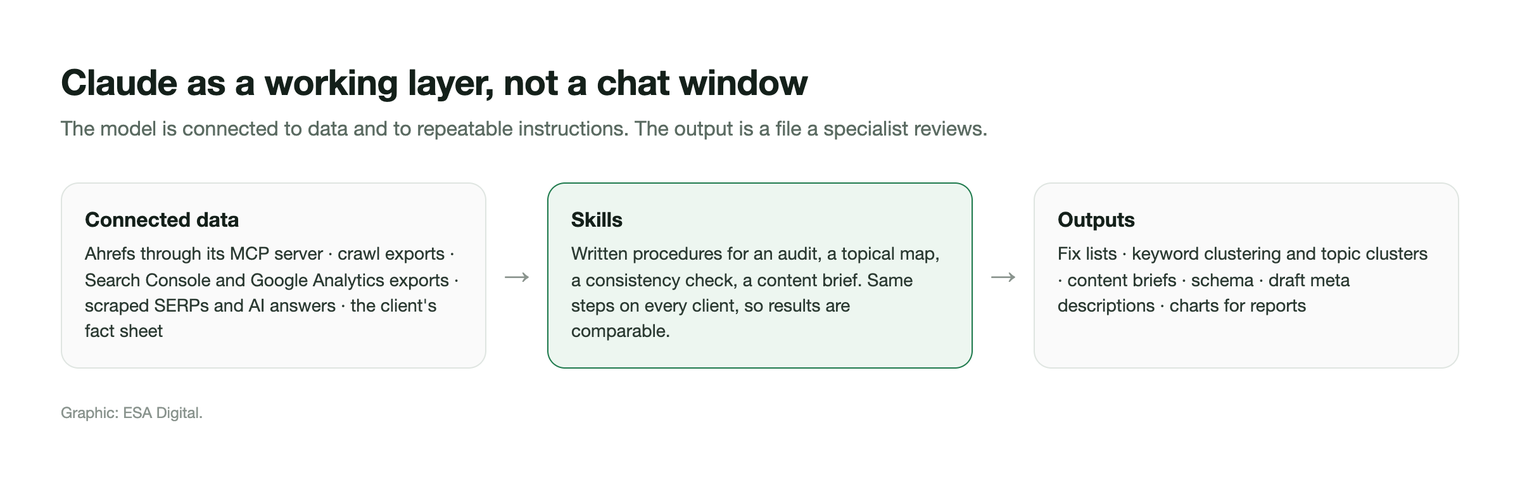
Most people use AI tools as a chat window for content creation. They do far more when connected to data: Ahrefs through its MCP server, crawl exports, search data, analytics exports and a fact sheet about the product. Add skills, which are written procedures for an audit, a topical map or a brief, and you get AI agents with a narrow job and a checklist.
Ways to use it:
- Join exports. Give it the crawl, the Search Console export and the analytics export. Ask for one table by URL with issues, clicks and conversions.
- Cluster keywords. Thousands of keywords grouped by search intent, with duplicates and prompt-like junk removed. Keyword clustering by hand takes days.
- Write content briefs. Feed it the scraped search results, People Also Ask and your product facts. Good content briefs save more time than any writing tool.
- Generate structured data and meta tags. Schema that matches the visible page, plus draft titles and meta descriptions. Generated meta descriptions are a starting point, never the final text.
- Suggest internal linking. From a crawl with page topics, ask for pages that should link to each other and do not.
- Check brand facts across sources. Compare your profile on six directories with your site. Different service lists and two spellings of one name are common, and AI models read those profiles.
- Build a redirect map. Match old and new URLs by content before a migration.
- Write small scripts. A term counter, a screenshot script, a regex for Search Console. Work that used to need a developer.
- Draft the report. Charts and tables from raw exports, ready for a person to comment.
Two prompts worth copying:
"Here are a crawl export and a Search Console export. Join them by URL. List indexable pages with more than 100 clicks that have a redirect, a missing canonical or a title over 60 characters. Show the row from each file for every finding."
"Here are 3,000 keywords with volume. Group them by search intent and topic. For each group give a target keyword, a page type and the total volume. Put anything that looks like a prompt, not a search query, in a separate list."
This is what AI SEO automation tools should do: take a defined input, apply the same steps every time, and hand back a file a person can check. The machine learning inside matters less than the procedure.
Where it goes wrong. A language model will give you a confident number that does not exist. Ask for the source row with every finding. It also tends to agree with the prompt, so ask it to argue against a finding before you accept it. And it does not know your product. The fact sheet matters more than the model.
Surfer Content Editor for drafts
Job: check a draft against the search results and LLM results before it ships.
The editor scores a draft against the pages that rank. Surfer now also positions it for content that gets cited in ChatGPT, Gemini and AI Overviews answers.
Ways to use it:
- Run it after writing, not before. Optimize content for the reader first, then add the terms that are truly missing.
- Use it for on page optimization of older pages. It shows which sections to expand and where a content gap opened since the last update.
- Work on page-two rankings. Pages in positions 11 to 20 respond fastest to content optimization, so optimize content there first.
Where it goes wrong. A high content optimization score does not make high quality content, and stuffing terms to reach it reads badly. Google rankings follow usefulness, and so do AI answers. Treat the score as a smoke alarm, not a goal.
What not to hand to AI
Fully generated articles. AI powered content creation is the most crowded category of AI tools and the least useful one for getting cited. A page needs something first-hand: a test, a case, a number. AI powered tools speed up the research and editing around that, and help you optimize content after it is written. They do not replace a content strategy.
Stage 3. Off-page: links, mentions and citations
Link building and digital PR used to be about links to your domain. The same work now decides which brands AI names, because AI answers are built from third-party pages. Traditional SEO tools still do most of the work here, but AI powered SEO has changed the target list.
Ahrefs for targets and backlink analysis
Job: decide where the brand needs to appear.
Ways to use it:
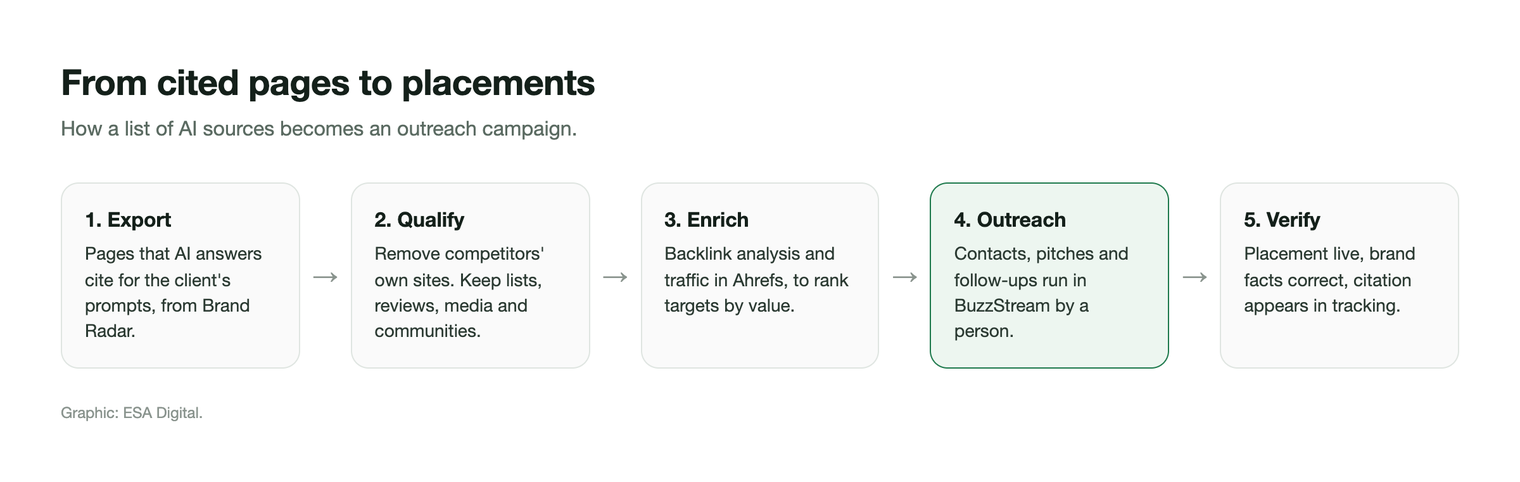
- Start from cited pages. Brand Radar lists the pages AI answers cite for your prompts. Remove competitors' own sites and keep comparison lists, reviews, media and communities.
- Rank targets with backlink analysis. Site Explorer adds traffic and link data to each target, so the list is sorted by value.
- Run a link intersect. Find sites that link to three competitors and not to you. Competitor data is the shortest route to a link building target list.
- Reclaim broken backlinks. Links that point to your deleted pages can be recovered with a redirect.
- Find unlinked mentions. Pages that name the brand without a link are the easiest outreach there is.
Where it goes wrong. Metrics do not show whether a site sells links to everyone. Someone has to open the page and read it.
BuzzStream
Job: run link building outreach as a process.
BuzzStream is an outreach CRM. It stores prospects, finds contacts, sends sequences and keeps the history of every conversation.
Ways to use it:
- Load the qualified target list and let the tool find contact details for each site.
- Set relationship stages. Not contacted, pitched, replied, won. Two people never write to the same editor.
- Schedule follow-ups. Many replies come only after a follow-up.
- Monitor won links. The tool checks that placements stay live and tells you when one disappears.
Where it goes wrong. It is the least AI powered tool on this list, and that is the point. Editors recognise generated pitches and ignore them. SEO automation helps with the list and the schedule. In link building, the first email should be written by a person.
Stage 4. Tracking and refresh
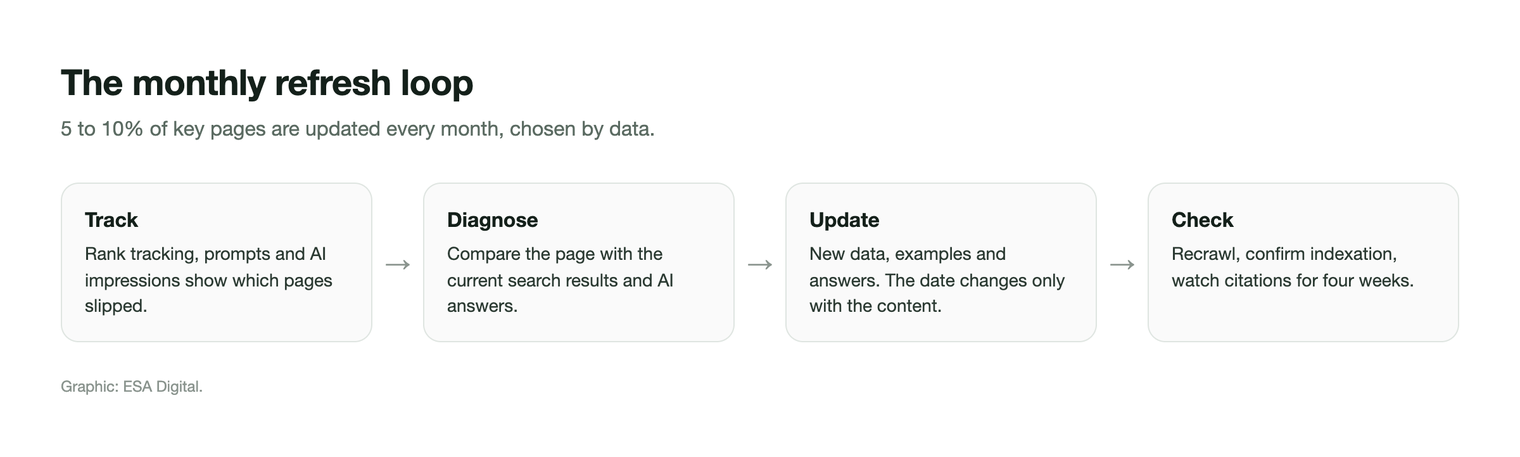
Rankings and citations decay when pages go stale. A workable rhythm is to update 5 to 10% of key pages each month.
Ahrefs Brand Radar
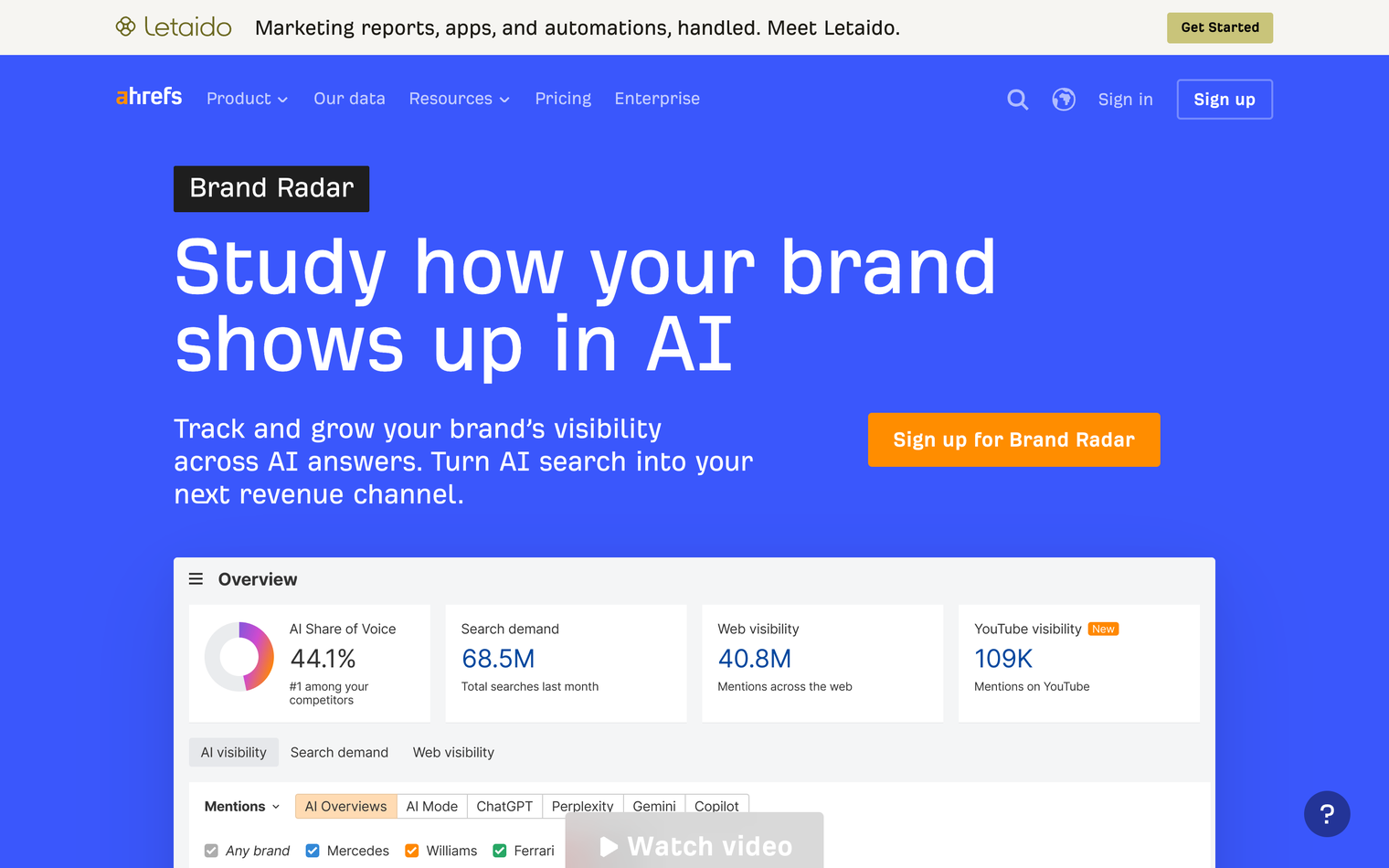
Job: track how AI answers mention and cite the brand.
Ways to use it:
- Track a fixed prompt set in ChatGPT, AI Overviews and AI Mode, and report share of voice against named competitors.
- Watch cited pages, not just mentions. When a page loses citations, it goes into the next refresh batch.
- Read the answers. How the brand is described matters as much as whether it is named.
This is the generative engine optimization side of reporting. We compared this category in a separate article on the best AI tools for tracking visibility.
Where it goes wrong. No tracker sees what a logged-in user sees, and plans differ in which engines they cover. Treat the numbers as a trend.
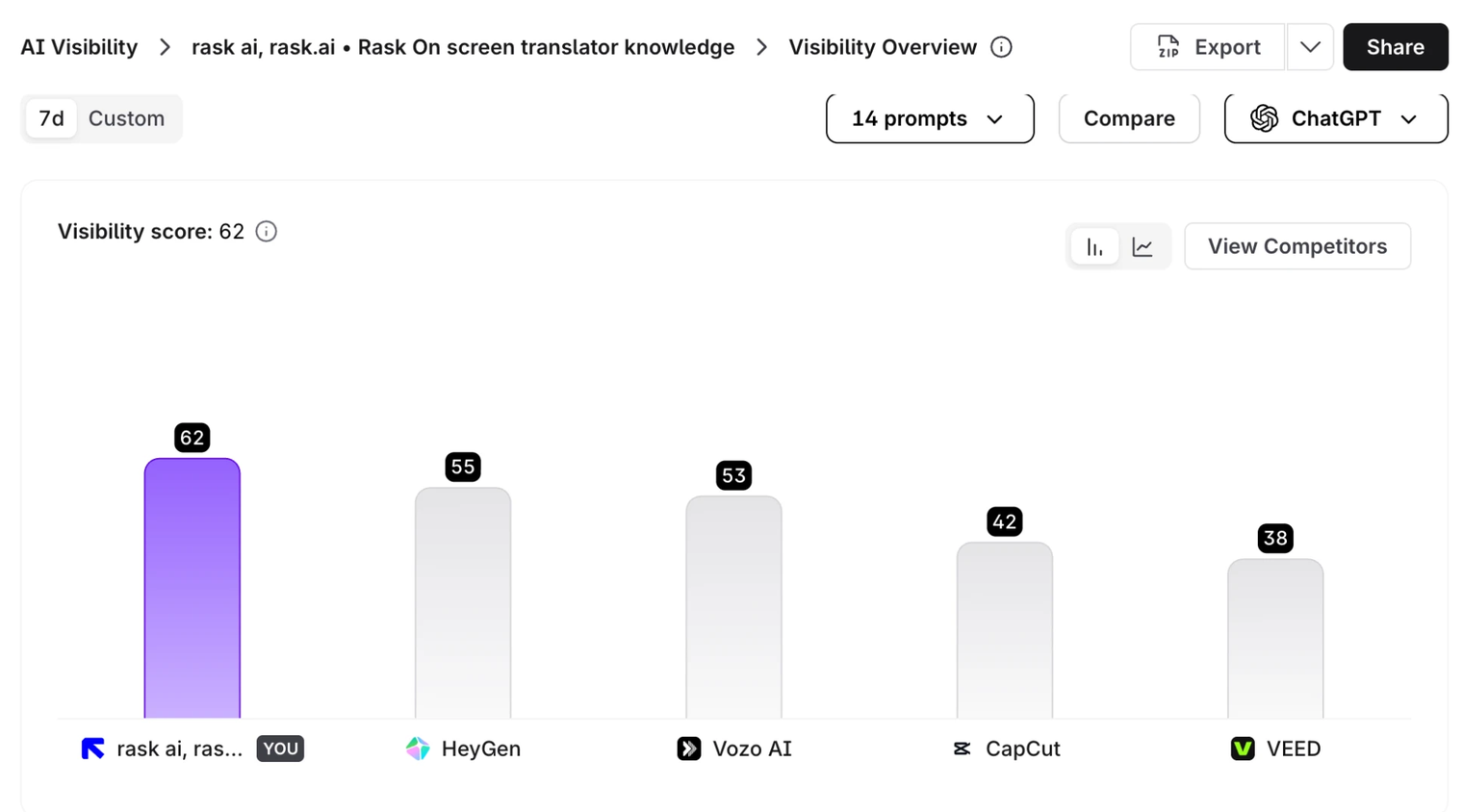
Surfer AI Tracker
Job: a second view of AI visibility, next to the content work.
Ways to use it:
- Track your own prompts. You write the prompts your buyers would ask and see who is named in the answers.
- Compare with a second tracker. Two tools with different prompt sets rarely agree on the exact number. When both show the same direction, trust it.
- Close the loop with the editor. A page that lost AI visibility goes straight into the Content Editor for a refresh.
Where it goes wrong. Results depend on the prompts you choose. A flattering prompt set gives a flattering score.
Rank tracking
Rank tracking still matters, and so does plain keyword tracking. A page has to be found before it can be quoted. Run rank tracking for the keyword map in Ahrefs Rank Tracker and review it monthly next to AI citations and Search Console data. Pages that slipped get compared with the current search results, updated, recrawled and watched for four weeks.
Best free AI SEO tools to start with
Website owners with a site under 500 pages can cover the basics with free tools.
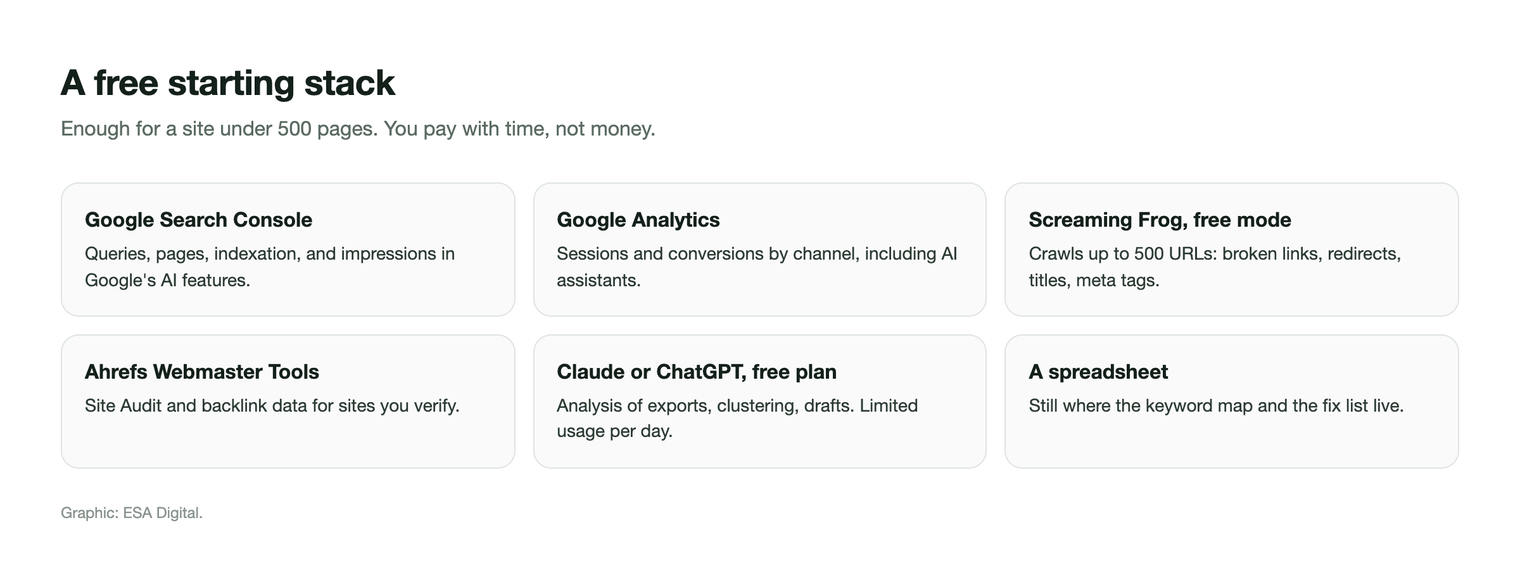
- Google Search Console for queries, indexation and AI impressions.
- Google Analytics for organic traffic and conversions by channel.
- Screaming Frog in free mode for technical audits up to 500 URLs.
- Ahrefs Webmaster Tools for site audits and backlinks on your own site.
- Claude or ChatGPT on a free plan for analysing exports and drafting.
The limit of the free stack is competitor analysis and keyword research at scale. A paid Ahrefs plan is the first upgrade to make.
SEO automation: what to automate and what to keep manual
SEO automation tools promise to run the whole SEO process. Some AI SEO automation tools even promise to publish for you. In practice SEO automation works on steps that repeat and produce output you can check.
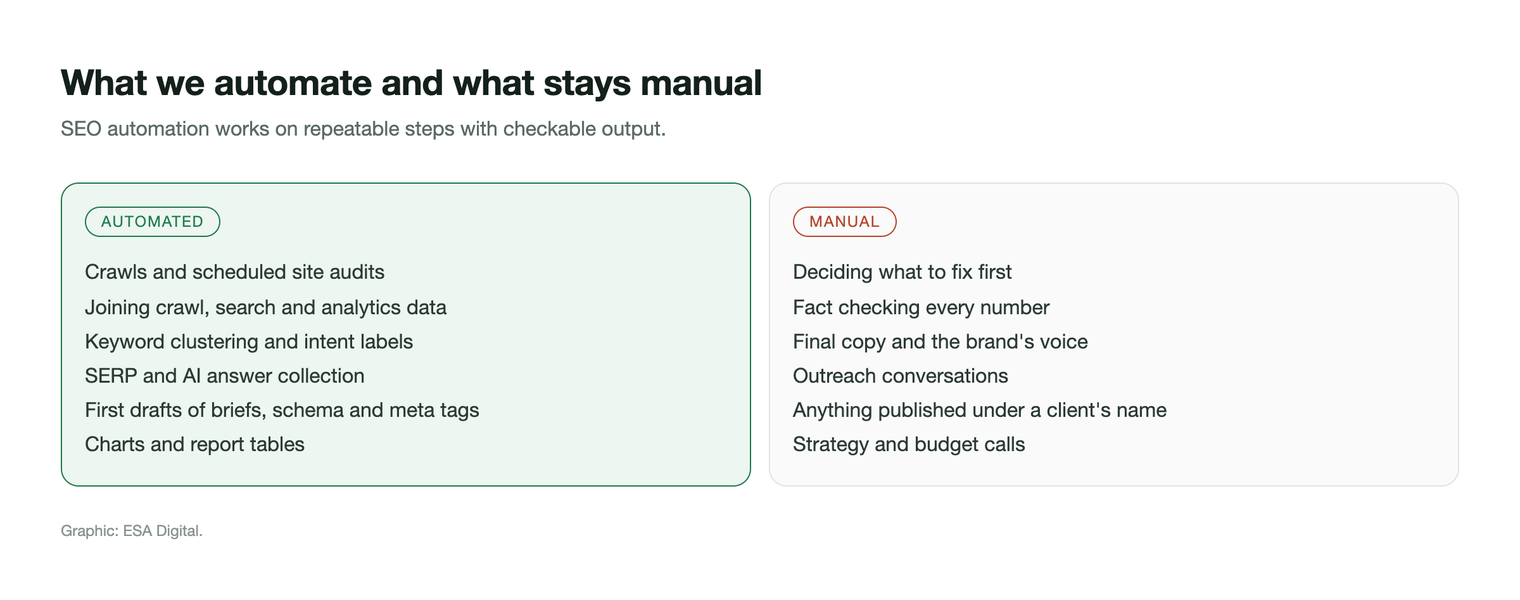
Automate crawls, scheduled technical audits, data joins, keyword clustering, result collection, first drafts and report charts. Keep priorities, fact checks, final copy and outreach manual. AI powered SEO fails when the second list gets automated too. AI driven insights are only useful when you can trace them to a URL, a query or a crawl row.
Search engine algorithms and AI models change often. A procedure you can edit ages better than closed SEO automation tools that hide their logic.
How to choose AI SEO tools
- Small businesses: start with the free stack. Add one paid tool when a specific job takes too long.
- In-house teams: the best AI tools for you are an AI assistant connected to your data and a content optimization tool. If technical SEO is the weak spot, add a crawler first.
- Agencies and SEO professionals: standardise crawl settings, exports and procedures. It keeps SEO content production consistent when the team grows.
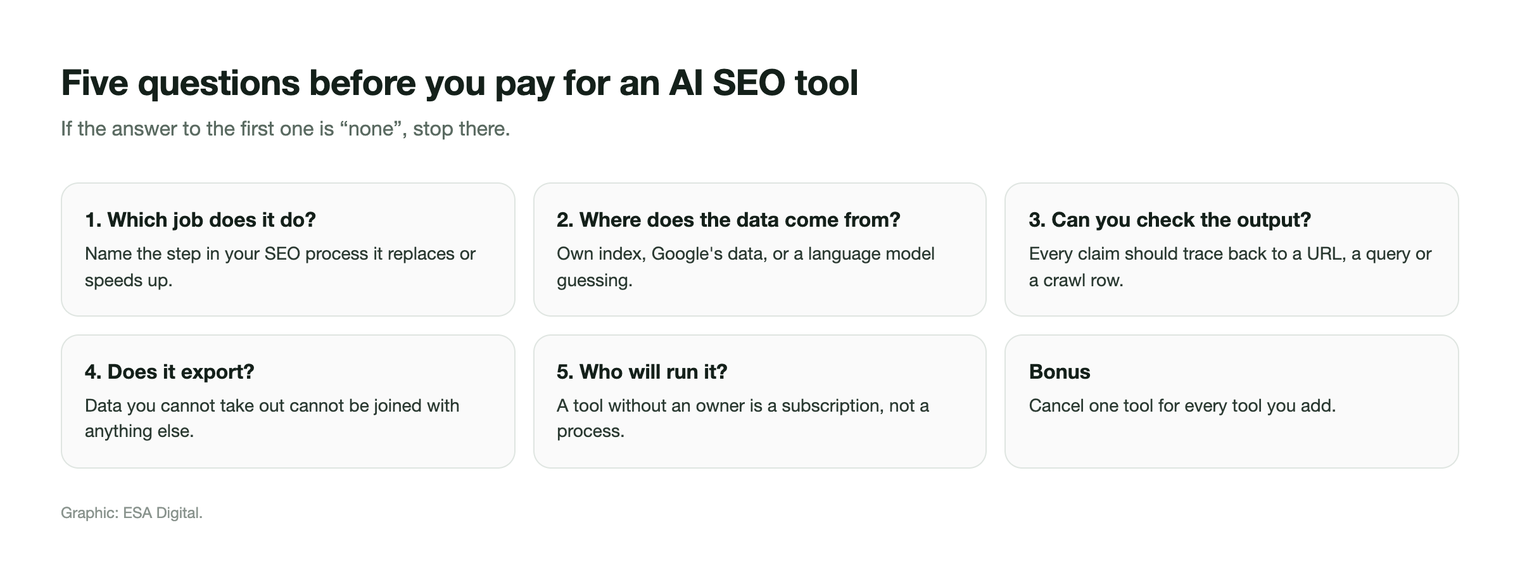
Many AI SEO tools sell a feature, not a job. Build the SEO strategy first. A tool cannot tell you which market to enter. It can only make your SEO efforts faster once you know.
Frequently asked questions
What are AI SEO tools?
AI SEO tools are software that uses machine learning or language models to do SEO tasks: keyword research, technical SEO audits, content optimization, link building and rank tracking. Some are classic SEO tools with AI powered features added, and some are SEO automation tools built around a language model. Others are AI assistants connected to SEO data.
What is the best AI SEO tool?
There is no single best one. For most teams the right set is a crawler, a keyword and backlink database, a content optimization tool and an AI assistant. In this stack those are Screaming Frog, Ahrefs, Surfer and Claude.
Can ChatGPT or Claude do SEO?
They can do parts of it well: keyword clustering, content briefs, schema, analysing exports. These are the best AI tools for joining data from other sources. They cannot crawl your site or see search data unless you connect them to it. They also invent numbers, so every output needs a check.
Are free AI SEO tools enough?
For a small site, yes. Google Search Console, Google Analytics, Screaming Frog in free mode and a free AI assistant cover audits and basic website optimization. You will need paid tools for competitor research and for tracking AI search visibility.
Do AI SEO tools help with AI Overviews and ChatGPT visibility?
Partly. Trackers show where you are mentioned and cited. Audit and content tools help make pages easy to quote with direct answers. Getting named still depends on third-party sources and consistent facts. This is the field of answer engine optimization and entity based SEO.
Will AI replace SEO specialists?
No. AI powered SEO automation removes repetitive work, and machine learning is good at patterns. They do not choose priorities, verify facts or build relationships. Blue links now share the page with AI answers, and that makes the judgment part of the job bigger.
How many SEO tools does a team need?
Fewer than most teams pay for. Seven cover the whole process here. Predictive analytics dashboards and all-in-one promises are easy to buy and hard to use. One owner per tool is a better rule than one tool per feature.
The bottom line
The best AI SEO tools are boring when you list them: a crawler, a data platform, a content checker, an outreach CRM, Google's own reports and an AI assistant. What matters is the order you use them in and who checks the output.
If you want this process run on your product, book a discovery call. We will show you what the search results and AI answers say about your category today.
